

Introduction:
The Smart IoT Water Tank Level Controller is an advanced automatic water management system that intelligently monitors and controls the water level in tanks. It is designed for homes, industries, and agricultural setups to ensure efficient water utilization, motor protection, and user convenience. In addition to automatic motor control, the system provides High and Low Water Level Alarms to alert users about overflow and low-water conditions, as well as a Pump Scheduling feature that allows the motor to operate at predefined times. The system works entirely offline through a direct Wi-Fi connection between the controller (NodeMCU) and the mobile app.
Description:
Built on the ESP8266 (NodeMCU) microcontroller platform, the Smart Water Level Controller uses an ultrasonic sensor to measure the water level inside a tank in real-time. The system automatically turns the motor ON when the water level falls below the defined low limit and switches it OFF when the tank reaches the high level. It includes configurable High and Low Level Alarms, which notify the user through sound or vibration when critical water levels are reached. The controller also supports Pump Scheduling, allowing up to multiple time slots per day for automatic motor operation without manual intervention. Additionally, the system features Dry Run Protection, which detects when the motor is running without water supply and immediately turns it off to prevent pump damage. All system settings — including tank height, alarm limits, schedule timings, and operating mode (auto/manual) — are securely stored in EEPROM memory, ensuring they remain intact even after power failure.
Working Principle:
The ultrasonic sensor continuously measures the distance from the top of the tank to the water surface. Based on this data, the controller calculates the water level percentage and compares it with the user-defined thresholds. When the level drops below the low limit, the motor is switched on, and if it reaches the high limit, the motor is switched off automatically while triggering the respective water level alarm if enabled. The Pump Schedule system, synchronized with the real-time clock (RTC), allows the motor to run automatically at preset ON and OFF times, even without user interaction. A web-based API running on the NodeMCU’s local server communicates with the Android application via HTTP requests, enabling real-time monitoring, alarm notifications, and full control over scheduling and motor operations directly from the user’s smartphone.
Components Required:
| Component | Qty | Buy Now |
|---|---|---|
| NodeMCU ESP8266 | 1 |  Buy Now Buy Now |
| Ultrasonic Sensor Module | 1 | Buy Now |
| 1 Channel 5V 30A Relay Module | 1 | Buy Now |
| LEDs (Blue, Green, Red,) | 4 | Buy Now |
| 220Ω Resistors | 4 | Buy Now |
| 5V 1A DC SMPS Power Adapter | 1 | Buy Now |
| Breadboard / PCB | 1 | Buy Now |
| Connecting Wires | 1 | Buy Now |
Circuit Diagram:
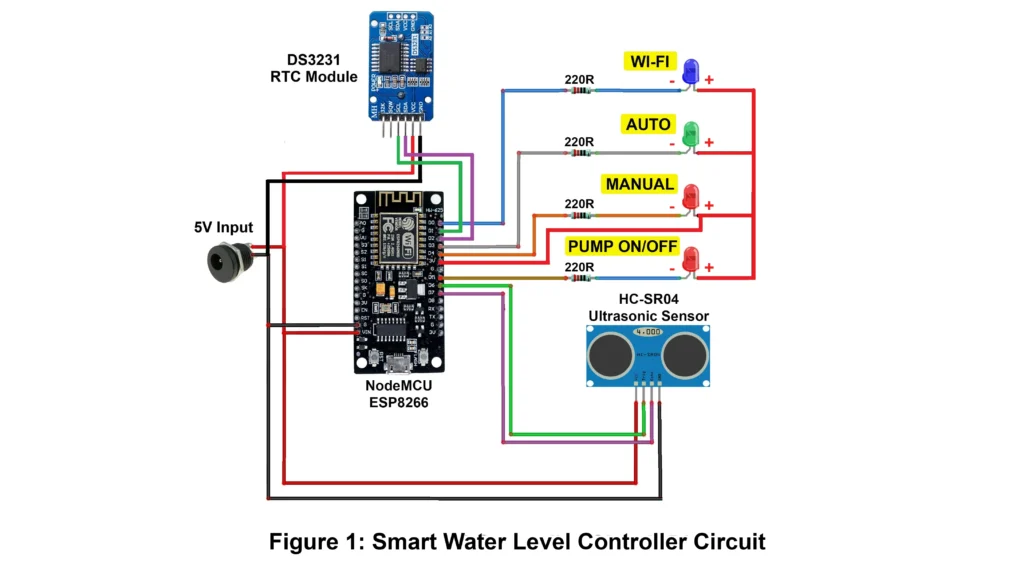
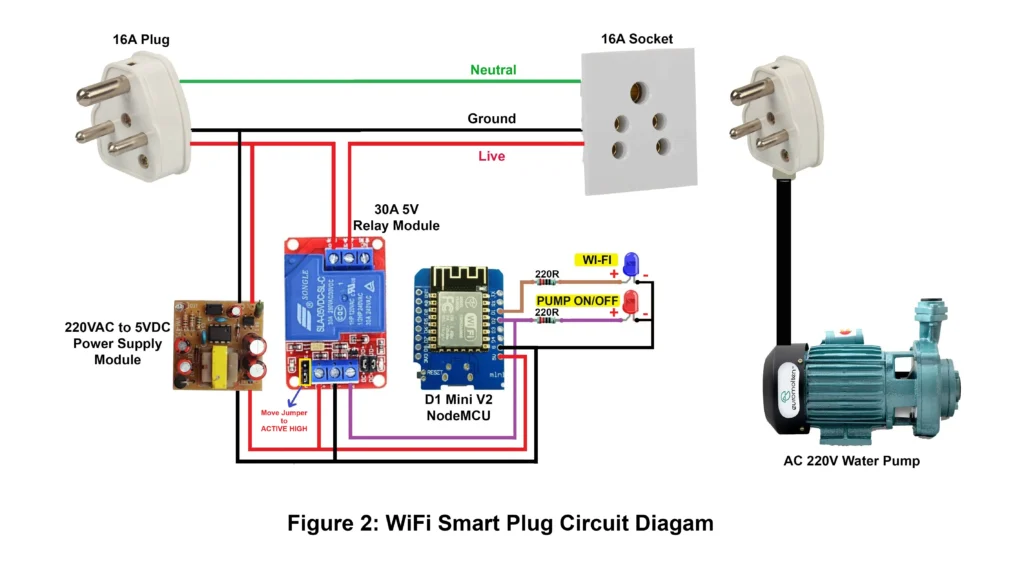
How to Connect App to Device:
STEP 1
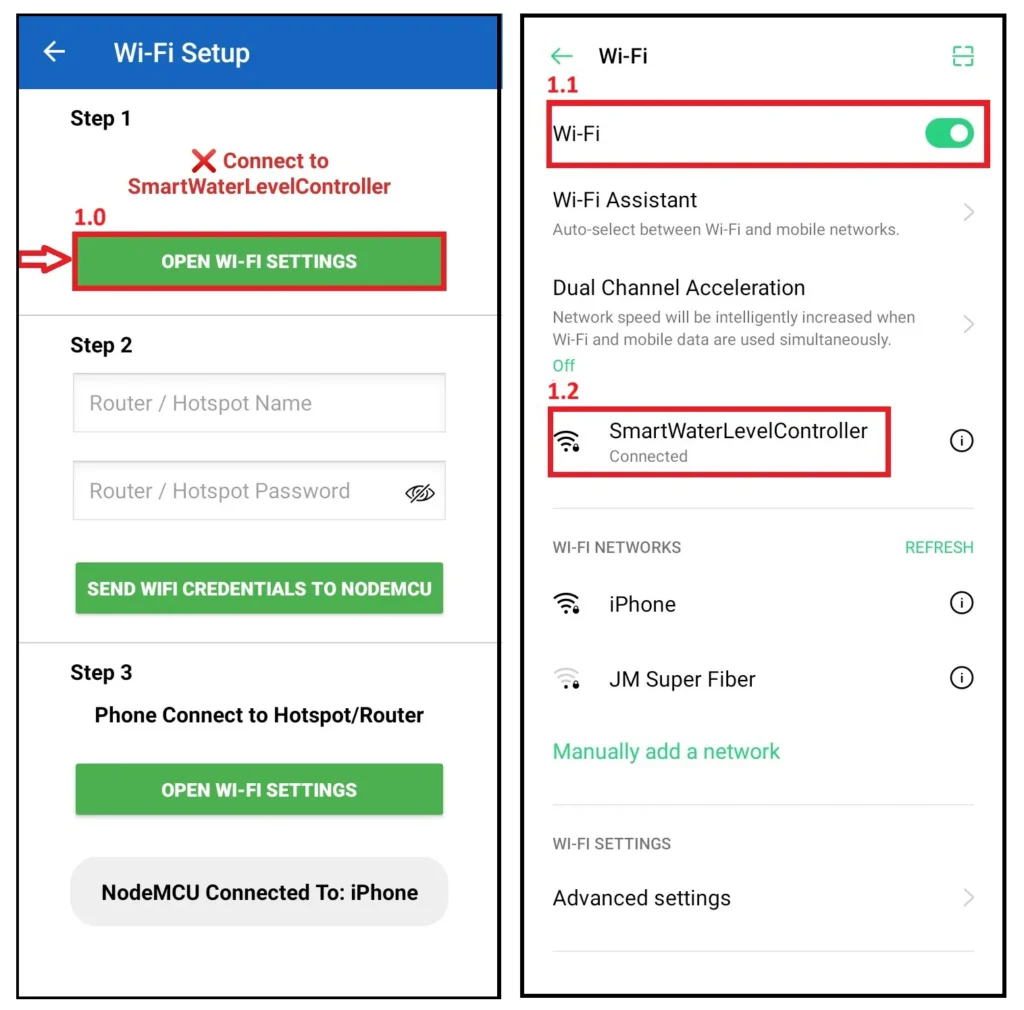
1.0 Open Wi-Fi Settings
Tap OPEN WI-FI SETTINGS in the app. This opens your phone’s Wi-Fi page so you can connect to the NodeMCU access point.
1.1 Turn Wi-Fi ON
Make sure the phone Wi-Fi toggle is ON. If it’s off, the app cannot reach the controller.
1.2 Connect to the NodeMCU
From the Wi-Fi list select **SmartWaterLevelController**.
Wait until it shows (Connected), then go back to the app.
STEP 2
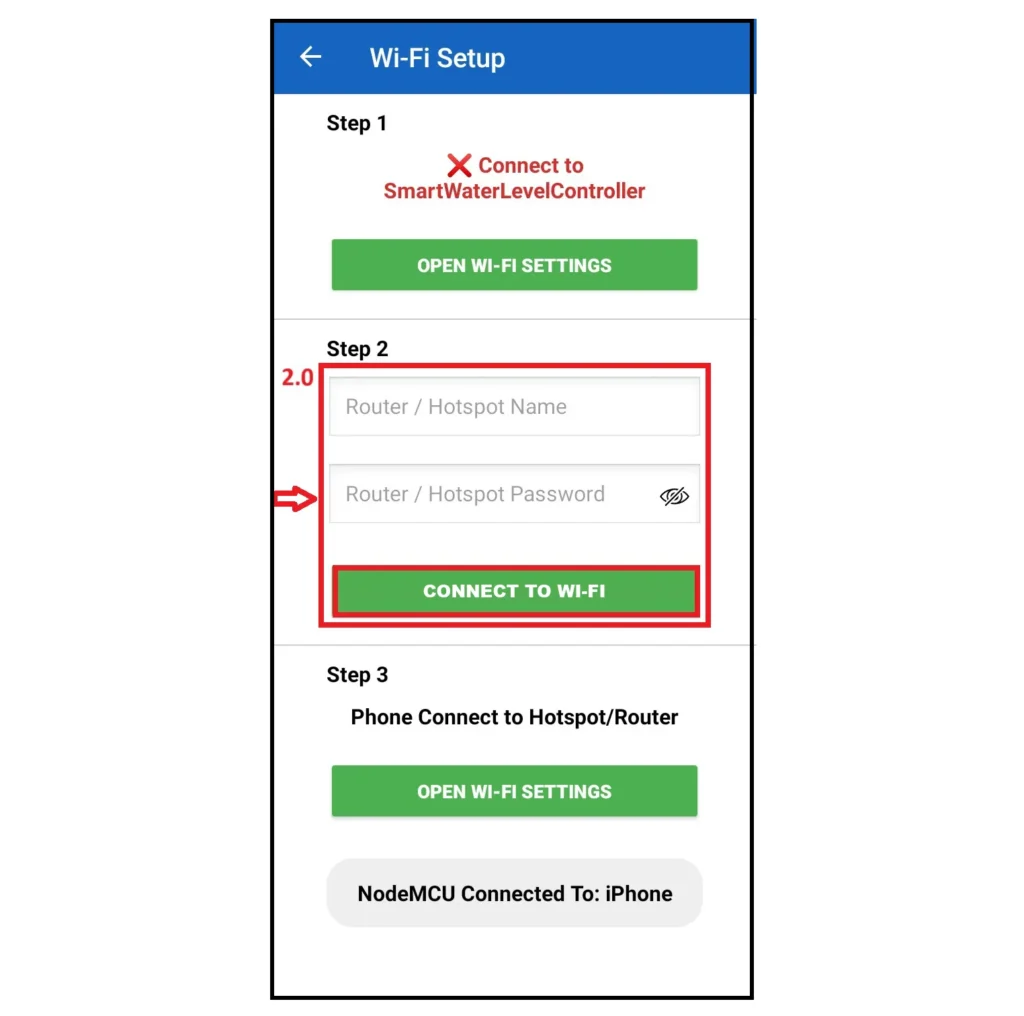
2.0 Enter the Wi-Fi name of your router or mobile hotspot in the first box, and type your Wi-Fi password in the second box. After entering both the Wi-Fi name and password, press the button “CONNECT TO Wi-Fi” This will send your Wi-Fi details to the device so it can connect to your network.
Step 3
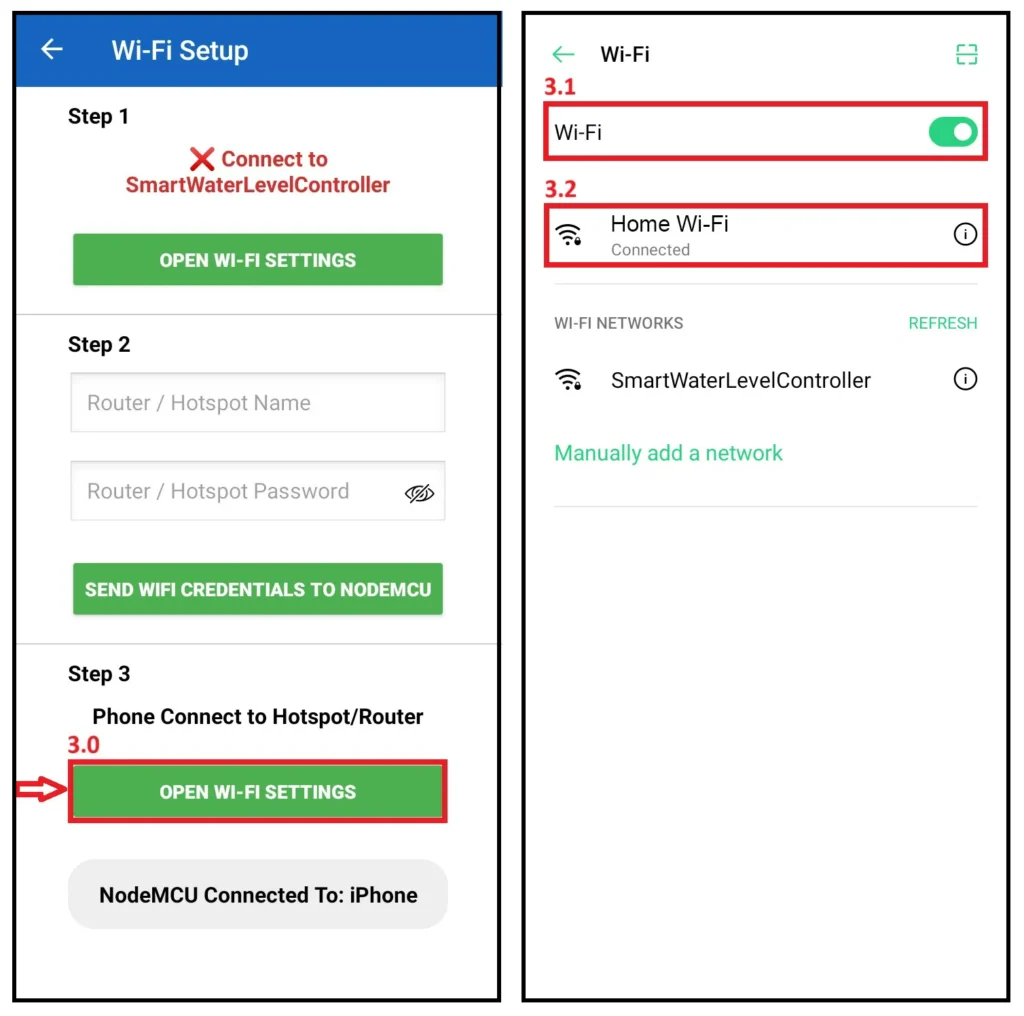
3.0 Open Wi-Fi Settings
Tap OPEN WI-FI SETTINGS in the app. This opens your phone’s Wi-Fi page.
3.1 Turn Wi-Fi ON
Make sure the phone Wi-Fi toggle is ON. If it’s off, the app cannot reach the your Hotspot/Router.
3.2 Phone Connect to the Hotspot/Router
Connect your phone to the same hotspot or router you selected for the NodeMCU. Once your phone shows “Connected,” return to the app.
Android App Functions:
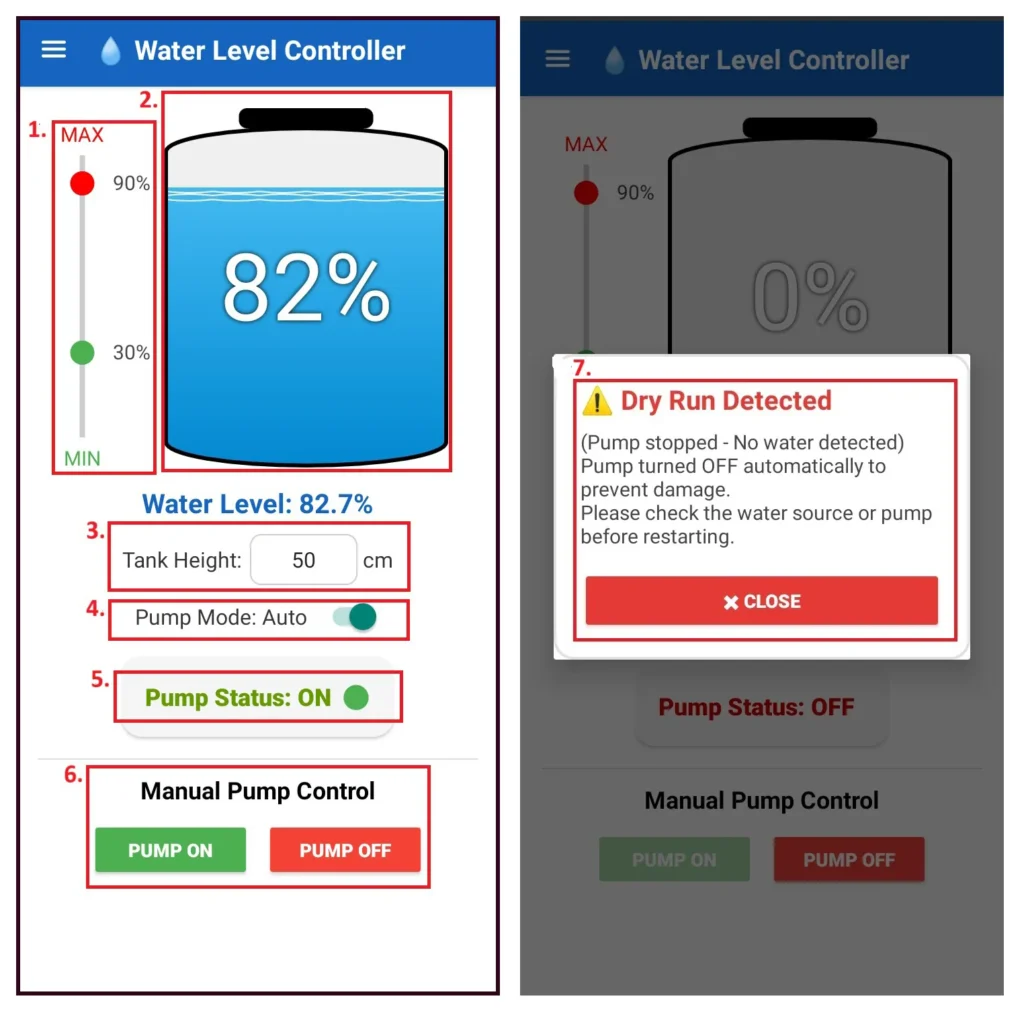
1. Set Low / High thresholds with the vertical slider
Use the vertical slider to set MIN (Low) and MAX (High) pump thresholds (example: 30% / 90%).
These percentages tell the controller when to:
• Start the pump (at or below MIN)
• Stop the pump (at or above MAX)
2. Main Tank View — live water level
The big tank graphic shows the current water level visually and as a large percentage in the center.
This updates live from the ultrasonic sensor.
3. Tank Height input (in cm)
Enter your tank’s real height in the Tank Height field.
Correct height is required so the app can convert distance → percentage accurately.
4. Pump Mode: Auto / Manual
• Auto: Controller automatically manages pump ON/OFF using thresholds.
• Manual: Automatic control is disabled so you can control the pump manually.
Tip: For a true manual override, switch to Manual mode first.
5. Pump Status
Shows current pump status:
• ON (Pump Running)
• OFF (Pump Stop)
• Dry Run OFF (Pump Stop)
If it shows (Not Connected), the app cannot reach NodeMCU.
6. Manual Pump Control buttons
Use PUMP ON or PUMP OFF to force the pump ON/OFF immediately.
Buttons remain blocked while Dry Run protection is active.
7. Dry Run detection popup
If water level does not rise while the pump runs, the controller will:
• Stop the pump
• The app shows a “Dry Run Detected” alert whenever the pump runs without water..
Press CLOSE to clear the alert.
Important: Check pump/water source before restarting.
Pump Schedule:
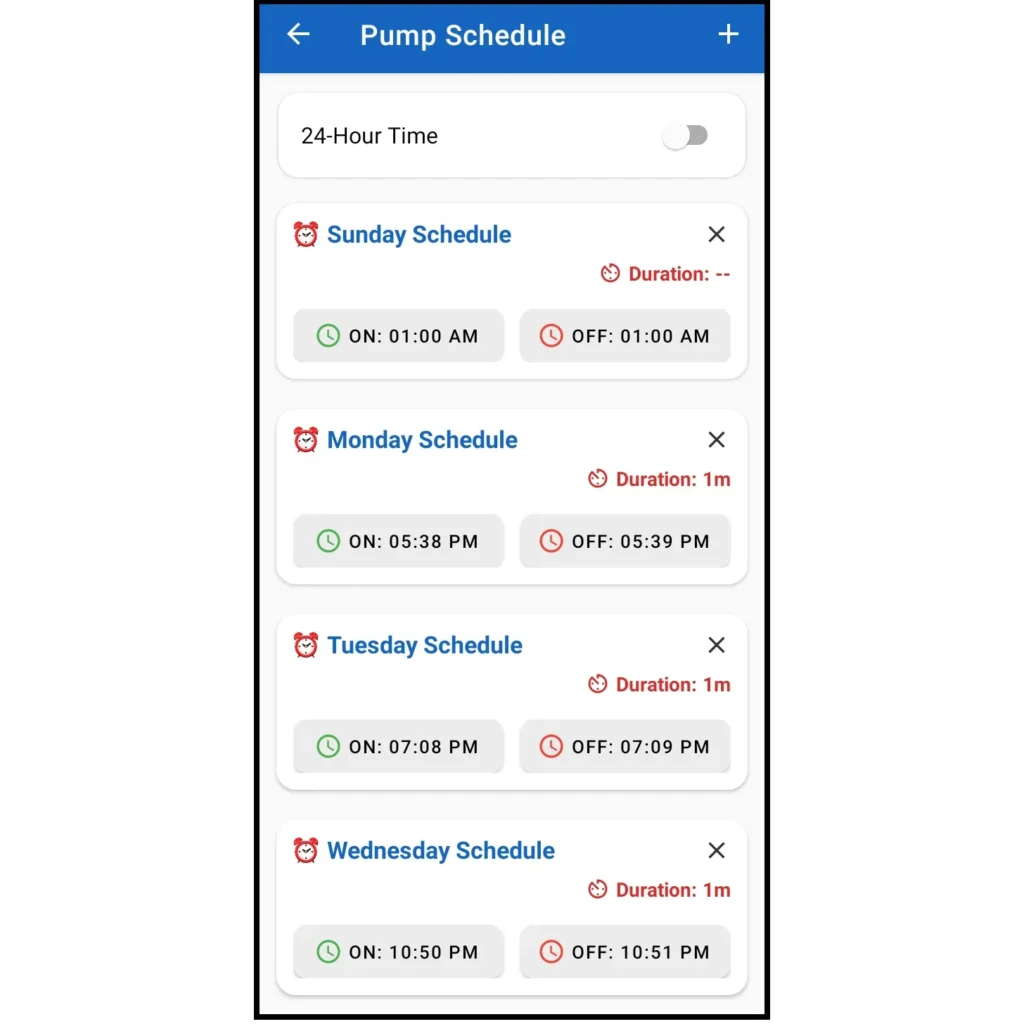
• Tap the “+” (Add) button on the Pump Schedule screen to create a new pump schedule.
• Choose 12-hour or 24-hour time format.
• Select a day (Sunday to Saturday).
• Set the Pump ON time.
• Set the Pump OFF time.
• You can add multiple schedules per day if needed.
Settings:
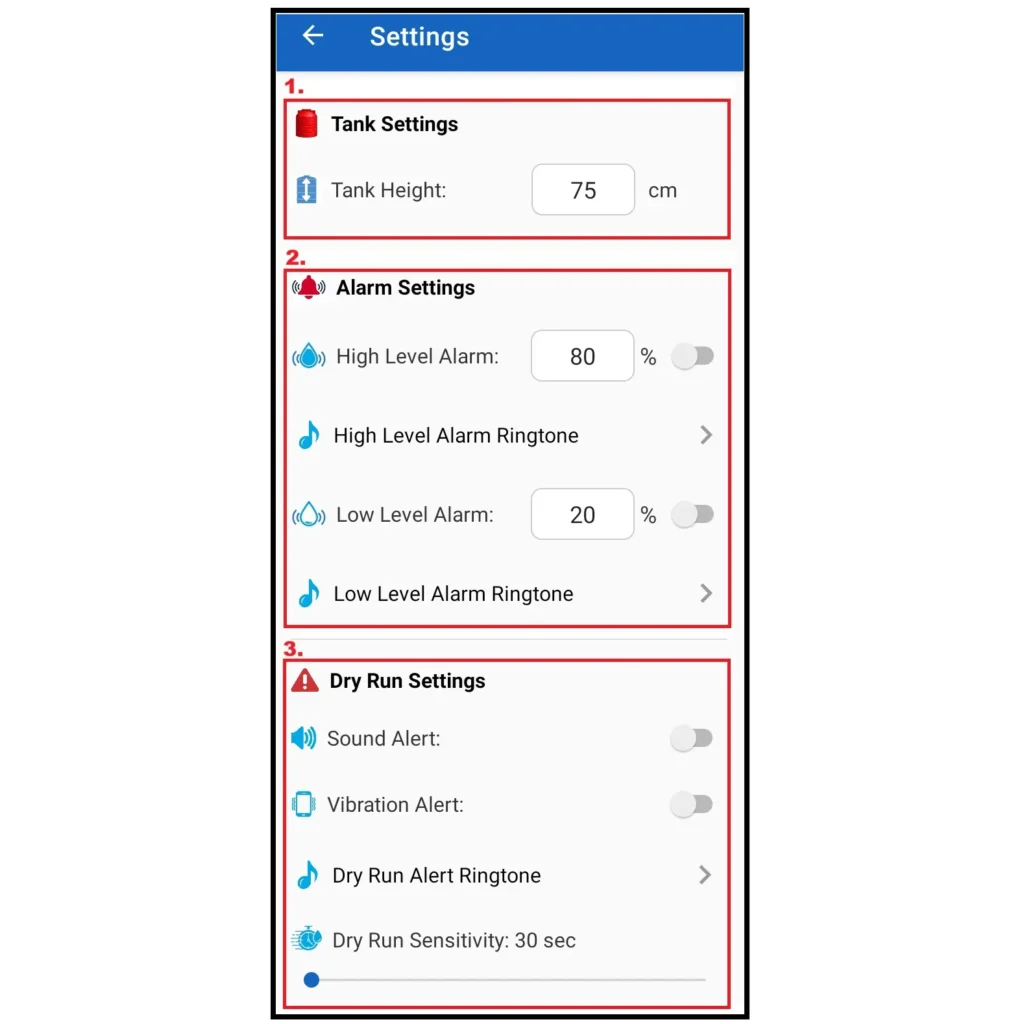
1. Tank Settings
• Measure the actual height of your water tank (from bottom to top).
• Enter this value in Tank Height (cm).
• This helps the controller calculate the correct water level percentage.
• Correct tank height is important for accurate level display, alarms, and pump control.
2. Alarm Settings
• High Level Alarm:
• Set the High Level percentage (example: 80%).
• Turn ON the High Level Alarm switch.
• Select a High Level Alarm Ringtone if required.
• When the water level reaches this value, the app will alert you to prevent overflow.
• Low Level Alarm:
• Set the Low Level percentage (example: 20%).
• Turn ON the Low Level Alarm switch.
• Select a Low Level Alarm Ringtone.
• When the water level drops below this value, the app will warn you about low water.
3. Dry Run Settings
• Sound Alert: Enable Sound Alert to get an audio warning during dry run.
• Vibration Alert: Enable Vibration Alert for vibration notification (useful in silent mode).
• Dry Run Alert Ringtone: Select a Dry Run Alert Ringtone if needed.
• Dry Run Sensitivity (seconds):
• Example: 30 seconds
• If water level does not increase within this time after pump ON, it is treated as dry run.
• When dry run is detected:
• Pump is automatically turned OFF.
• User receives alert notification.
• This feature protects the pump from damage caused by running without water.
Advantages:
- Fully automatic water control with real-time monitoring.
- Direct Wi-Fi connectivity without cloud dependency.
- Protects motor with built-in dry-run detection.
- Saves water, electricity, and manual effort.
- Local data storage ensures reliability even after power failure.
- User-friendly Android interface for configuration and control.
- Works efficiently for single-phase submersible or overhead tank motors.
- Compact, safe, and long-lasting design suitable for residential and commercial use.
Conclusion:
The Smart Water Level Controller by RoboComp Technology delivers an innovative, efficient, and reliable solution for modern water management. By combining IoT-based local Wi-Fi communication, intelligent automation, and safety features like dry-run protection, it offers a complete smart control experience. This system is ideal for those seeking a practical, professional, and maintenance-free way to automate their water tank operations.
Complete Project Code:

🔒 App Privacy Policy | 📄 App Terms & Conditions
1 Comment